
Turn your Google Calendar™ events into timesheets
and team utilization reports.
Your team's time is already in Google Calendar.
Time Reports Pro turns it into automatic timesheets and utilization reports —
no new tools, no behavior change.
Timesheet Reporting — Export any calendar into a clean, formatted timesheet in minutes.
Set the date range, select the events, generate the sheet.
Utilization Reports — See exactly where your team's time is going.
Hours by client, by project type, by team member — all from data that's already in your calendar.
Team Collaboration — Connect your whole team's calendars under one subscription.
One billing seat per user, centralized field management, shared reporting.
For teams that run on Google Workspace

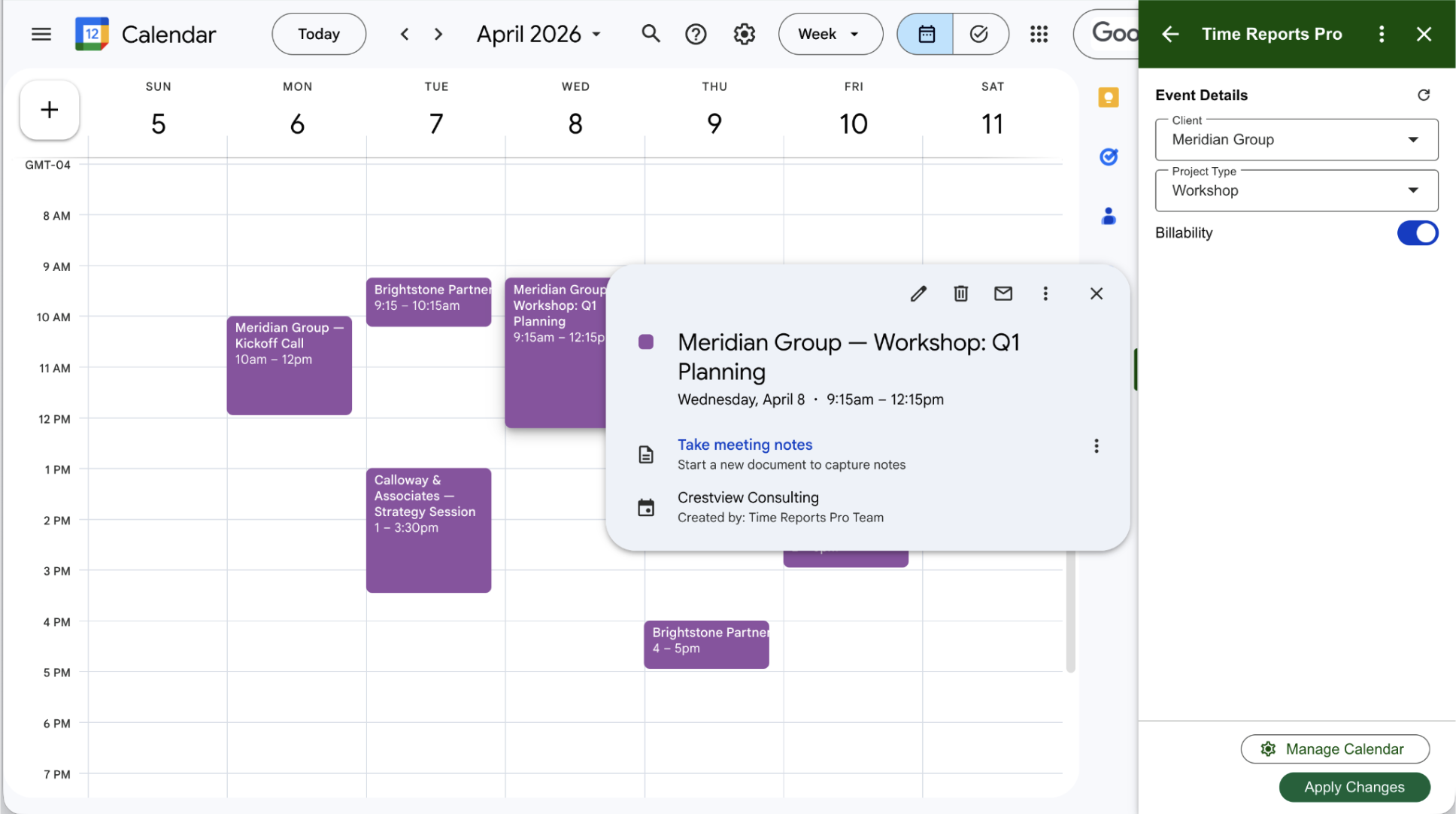
Capture details like "Client," "Rate," or "Payment Status" directly on your events using dropdowns and toggles.

Create easy to read timesheets for you or your employees so they know when and where to be.

Invite your team. One subscription covers everyone, with centralized billing and seat management.
Customize Your Data
Define the fields that matter to your team — Client, Project Type, Billability, and more. Set them once and they're available on every event, for every team member.
Generate Spreadsheets
Every report goes straight to Google Sheets — no exporting, no reformatting. Filter by client, date range, team member, or any custom field you've defined.
Frequently Asked Questions
Time Reports Pro is a Google Calendar add-on built specifically for professional services teams on Google Workspace. It turns your team's existing calendar events into timesheets and utilization reports — automatically, without changing how anyone works.
We've put together answers to the questions we hear most often from operations managers, HR leads, and agency owners who are evaluating TRP for their teams.
Whether you're trying to understand how setup works, how team reporting is structured, or what's included in the free trial, you'll find the answers below.
Still have questions? Email us at hello@time-reports.com.
-
Time Reports Pro is a Google Calendar add-on that turns your team's existing calendar events into timesheets and utilization reports, automatically exported to Google Sheets. It works inside Google Calendar — no new tools, no behavior change required. If an event is on the calendar, it can be in the report.
-
Most time tracking tools require your team to log hours in a separate application. Time Reports Pro works differently: it adds a reporting layer directly on top of Google Calendar, so your team never has to change how they work. There's no second tool to log into and no data to reconcile. If your team already lives in Google Calendar, their time is already tracked.
-
Time Reports Pro is built for professional services teams on Google Workspace — typically 10 to 50+ people. It works especially well for HR and L&D consultancies, marketing and creative agencies, staffing and recruiting firms, and management consulting teams. Any team that schedules client work, billable hours, or project time in Google Calendar can use TRP to report on it.
-
No. Time Reports Pro adds a sidebar panel inside Google Calendar. Your team continues scheduling events exactly as they do today. The only addition is optional custom fields — like Client, Project Type, or Billability — that can be filled in directly on each event. The fields are set once by an admin and available to every team member automatically.
-
Time Reports Pro generates timesheets, utilization reports, and custom spreadsheet exports — all delivered directly to Google Sheets. You can filter by client, date range, team member, project type, or any custom field you've defined. Reports can be shared, downloaded, or used as the basis for client billing.
-
Each team member connects their own Google Calendar to Time Reports Pro under a shared team subscription. Once connected, their calendar events are visible in shared reports. An admin can set team-wide custom fields so every team member is tagging events consistently. There's no per-user setup beyond connecting a calendar.
-
Most teams are up and running in under 10 minutes. Installation is a single click from the Google Workspace Marketplace. Custom fields take 2–3 minutes to configure. Your first report can be generated immediately after tagging a handful of calendar events.
-
Yes. Time Reports Pro accesses your Google Calendar data only to generate reports on your behalf. We do not have access to see or read the events on your calendar. Data is not stored, sold, or shared with third parties. Full details are available in our Privacy Policy at time-reports.com/privacy.
-
Yes. Time Reports Pro includes a 7-day free trial with no credit card required. Install it from the Google Workspace Marketplace and explore all features before committing.
Have a large team and need an extended trial? Email us at hello@time-reports.com
Simple, Transparent Pricing.
$12 per user / per month for Unlimited Calendars, Reports, and Custom Fields.
7-day free trial - no credit card required.
Contact us with questions with questions or Enterprise pricing (25+ users)